ChatGPT for Seniors: A Step-by-Step Guide

Key Takeaways
- ChatGPT is a free artificial intelligence (AI) tool that can help seniors with everyday tasks like answering questions, writing messages, and finding information, all using plain conversational language.
- Seniors can start using ChatGPT with no technical background. If your loved one can type a question, they can use it.
- ChatGPT works best for tasks like drafting letters, simplifying complex information, organizing ideas, and learning new things at their own pace.
- Seniors should never share personal information like Social Security numbers, passwords, or financial details with ChatGPT.
- Caregivers can play an important role in setting up ChatGPT and helping seniors feel comfortable using it safely.
You may have read about or heard about how artificial intelligence (AI) tools are making an impact on people both personally and professionally. AI tools are a big topic of discussion today, and ChatGPT is one of the most talked-about. For many caregivers, the natural question is whether something like this could genuinely help their loved one. The honest answer is yes, with the right setup and a little guidance.
When considering how ChatGPT for seniors could benefit daily life, don’t think of it as a way of keeping up with the latest technology trend. Instead, think of AI use as having a patient, always-available tool that can answer questions, help write a message, explain a confusing medical letter, or simply have a conversation at any hour of the day. This guide explains how to use ChatGPT for seniors step-by-step, including what ChatGPT is, how to get started, and how caregivers can help seniors use it safely.
ChatGPT Can Help Seniors Make Daily Tasks Easier
ChatGPT is an AI-powered tool that responds to typed questions and requests in plain, natural language. There is no need to learn special commands or navigate complicated menus. Your loved one can type something as simple as “How do I get a grass stain out of cotton?” or “Can you help me write a thank-you note to my neighbor?” and get a helpful, clear response.
For seniors, some of the most practical uses include:
- Getting simple explanations of health topics or medication information without wading through medical websites
- Drafting letters, emails, or messages when writing feels difficult
- Finding answers to everyday questions without needing to search through multiple web pages
- Getting recipes and meal ideas based on dietary needs
- Staying mentally engaged through conversation, trivia, and learning new topics
For seniors with hearing loss in particular, a text-based tool like ChatGPT removes the communication barriers that come with phone calls or video chats. Everything happens in writing, at whatever pace feels comfortable.
Seniors Can Use ChatGPT with Simple Step-by-Step Prompts
One of the best things about ChatGPT for seniors is that it responds to plain, everyday language. There is no right or wrong way to phrase a question. Seniors do not need to learn any special vocabulary or format. If they can describe what they want, ChatGPT can help.
A “prompt” is simply what your loved one types into the chat box. Here are a few examples of simple, effective prompts:
- “Explain what high blood pressure means in simple terms.”
- “What are some gentle exercises I can do at home?”
- “What should I ask my doctor about my new medication?”
The key is to be specific. The more detail your loved one gives, the more useful the response will be. Encourage them to think of ChatGPT the way they would a helpful, knowledgeable friend they can ask anything.
ChatGPT Can Support Communication, Organization, and Learning

Beyond answering simple questions, AI tools for seniors like ChatGPT are genuinely useful across several areas of daily life.
Communication. Writing can be tiring, especially for seniors who find it hard to find the right words. ChatGPT can draft a letter to an insurance company, help compose a message to a doctor’s office, or write a heartfelt note to a family member. Your loved one can give the basics and let ChatGPT fill in the language.
Organization. ChatGPT can help seniors think through decisions, make simple lists, or organize their thoughts before a doctor’s appointment. Typing out “I have a doctor’s appointment and I’m worried about my medication side effects, what questions should I ask?” gives back a thoughtful, organized list.
Learning. Many seniors enjoy learning new things but may not know where to start. ChatGPT can explain topics in simple terms, teach basic skills step by step, recommend books or podcasts based on interests, or explore history, science, or current events through conversation.
Emotional support. ChatGPT can be a low-pressure space for conversation. It does not replace human connection, and caregivers should make sure their loved one stays engaged with friends, family, and community. But for seniors who spend a lot of time alone, having a responsive conversational tool available can help reduce the sense of isolation.
Seniors Should Avoid Sharing Private Information with ChatGPT
ChatGPT is a powerful tool, but it is not a secure, private platform in the way that a doctor’s office or bank is. Seniors should never enter:
- Social Security numbers
- Bank account or credit card numbers
- Passwords or PINs
- Home address or phone number (beyond what they are comfortable sharing publicly)
- Detailed medical records or insurance account numbers
A good rule of thumb is this: if your loved one would not say it to a stranger at the grocery store, they should not type it into ChatGPT.
This is worth having a direct conversation about before getting started. Many seniors are accustomed to providing personal information when asked, and AI tools can feel official and trustworthy. Make sure your loved one understands that ChatGPT does not need their personal details to help with most tasks.
Caregivers Can Help Seniors Use ChatGPT Safely
The caregiver’s role here is to help set seniors up with the technology as well as to help them build confidence and establish good habits from the start.
A few practical ways caregivers can help:
Do the first session together. Sit with your loved one and walk through a few questions as a team. Let them type the prompts themselves, but be there to guide them. This builds familiarity and shows them that it is not complicated.
Create a short “safe use” reminder. Write down or print a simple note with two things: what ChatGPT is good for, and what information to never share. Keep it near the computer or device.
Start with something fun. Have your loved one ask ChatGPT about something they genuinely enjoy, a hobby, a favorite book, a recipe, a historical event they find interesting. A positive first experience goes a long way.
Check in regularly. Ask your loved one what they have been using ChatGPT for. This keeps you informed and opens up conversation about anything that confused or concerned them.
Reinforce that it makes mistakes. ChatGPT is helpful but not infallible. It can sometimes give incorrect information, especially about medical topics or current events. Encourage your loved one to verify important information with a doctor, pharmacist, or trusted source before acting on it.
What Is ChatGPT and Why Should Seniors Care?
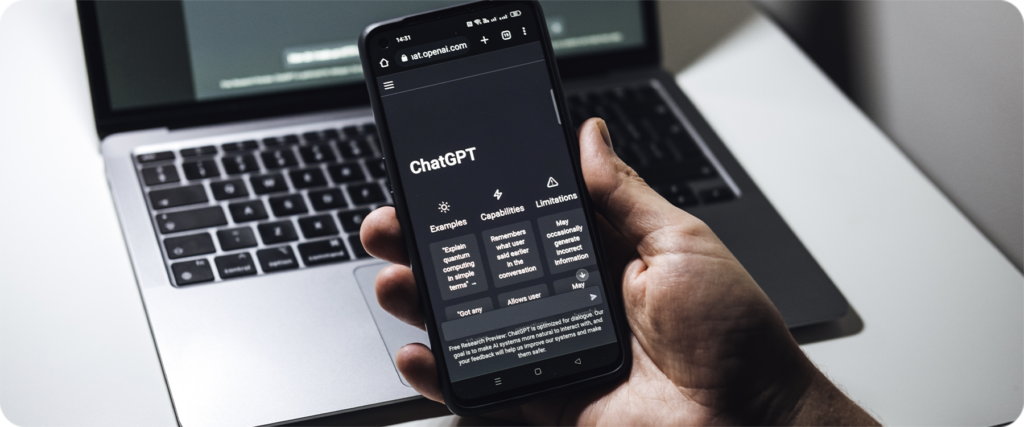
ChatGPT is made by a company called OpenAI. It is trained on a large amount of text, which allows it to understand questions and generate helpful responses. Think of it as a very well-read assistant that has no personality of its own but can adapt to what you need.
The main appeal of ChatGPT for seniors is its simplicity. There is nothing to download on most devices. It runs in a web browser, the same way someone might check email or read the news. There is a free version that works well for everyday tasks, and a paid version with additional features, though most seniors will find the free version more than sufficient.
What makes ChatGPT different from a simple internet search is the conversational format. Instead of getting a list of links, your loved one gets a direct answer they can read, respond to, and ask follow-up questions about, all in one place.
How to Use ChatGPT for Seniors: Step-by-Step
Step 1: Setting Up Your Free ChatGPT Account
- Open a web browser (Chrome, Safari, or Edge all work well) and go to chat.openai.com.
- Tap or click Sign Up to create a free account. You will need an email address and a password.
- Follow the prompts to verify your email address. OpenAI will send a confirmation email to the address you used.
- Once verified, log in and you will see the main chat screen. There is a text box at the bottom where you type your questions.
That is all there is to it. No downloads, no complex setup. The account is free, and the basic version works on any device with an internet browser.
Step 2: How to Type Your First Question (Prompt)
- Tap or click inside the text box at the bottom of the screen.
- Type your question or request in plain language. For example: “What are some good hobbies for someone who enjoys reading and puzzles?”
- Press Enter on the keyboard (or tap the send arrow on a phone or tablet).
- ChatGPT will respond within a few seconds. Read the answer, and if you want to follow up, just type another question in the same box.
There is no need to start over each time. ChatGPT remembers the conversation as long as you stay on the same chat. If you want to ask about something completely different, tap New Chat in the top left corner to start fresh.
Best Ways Seniors Can Use ChatGPT Every Day
Once your loved one is comfortable with the basics, here are some of the best ways for seniors to learn AI ChatGPT tools and build them into a daily routine:
Morning news briefing. Ask ChatGPT to summarize the day’s top news in simple terms, or to explain a news story they heard about but did not fully understand.
Help with letters and messages. Use it to draft anything from a complaint letter to a utility company to a warm note for a friend’s birthday.
Recipe ideas. Type in “give me a simple dinner recipe using chicken and vegetables that does not require more than 30 minutes” and get a clear, step-by-step recipe.
Health questions. Ask for plain-language explanations of medical terms or conditions before a doctor’s appointment. Remind your loved one to always discuss health decisions with their doctor.
Brain exercises. Ask ChatGPT to give a trivia quiz, play a word game, or discuss a favorite topic. Staying mentally engaged is good for overall health.
Tech help. If your loved one is confused by something on their phone or computer, they can describe the problem to ChatGPT and often get a clear, step-by-step answer.
Is ChatGPT Safe for Seniors to Use?
For most everyday tasks, yes, ChatGPT is safe. It does not contain viruses, and simply using it does not put your loved one’s device at risk. The main safety considerations are about information sharing, not the technology itself.
The important boundaries to set:
- No personal identifying information (Social Security number, bank details, passwords)
- Verify important health or legal information with a professional before acting on it
- Be aware that ChatGPT’s knowledge has a training cutoff date, so it may not know about very recent events or changes in law or medicine
Some caregivers also worry about their loved one forming an unhealthy reliance on ChatGPT for emotional support. This is a reasonable thing to be mindful of. ChatGPT can be a good conversational companion, but it is not a replacement for relationships with family, friends, and community. Check in with your loved one regularly and make sure they are staying connected to the people in their lives.
Tips for Seniors Learning AI Tools Like ChatGPT

Learning any new technology takes a little patience. These tips can make the process smoother:
Go slowly. There is no rush. Spend a few minutes a day exploring, and let familiarity build naturally.
Write down what works. If your loved one finds a prompt that gives a great answer, encourage them to write it down so they can use it again.
Ask the same question different ways. If the first answer is not quite right, try rephrasing the question. ChatGPT responds differently to different wording.
Use large text if needed. Most browsers allow you to increase the text size on the screen using Ctrl + (on Windows) or Command + (on Mac). This makes reading responses easier.
Make it social. Some seniors enjoy sharing interesting ChatGPT conversations with family members. Turning it into something to talk about makes it feel less isolating and more engaging.
ChatGPT vs. Other AI Tools for Seniors
ChatGPT is the most widely known AI chatbot, but it is not the only option. Here is a brief look at how it compares to a few other AI tools for seniors:
Google Gemini is Google’s AI assistant, which integrates closely with Google Search and Gmail. Seniors already using Google products may find it a natural fit. It is available at gemini.google.com.
Microsoft Copilot is built into Windows computers and Microsoft Edge, which means many seniors may already have access to it without realizing it. It works similarly to ChatGPT and can be a good option for those already comfortable with Microsoft products.
Apple’s Siri is voice-based rather than text-based, which can be helpful for seniors with limited typing ability, but it does not offer the same depth of conversational response as ChatGPT.
For most seniors new to AI tools, ChatGPT’s free version is a solid starting point because of its clean, simple interface and the depth of its responses. From there, caregivers and seniors can explore other AI tools for seniors as comfort grows.
Frequently Asked Questions
Is my personal information safe when using ChatGPT?
Your information is only as safe as what you choose to share. ChatGPT itself does not ask for personal details to function. As long as your loved one does not type sensitive information like Social Security numbers, bank details, or passwords into the chat, the risk is minimal. OpenAI does use conversation data to improve its systems, so it is best to treat ChatGPT as a public tool rather than a private one.
Do I need to be tech-savvy to use ChatGPT?
No. If your loved one can type a question and read an answer, they can use ChatGPT. The interface is simple: a text box, a send button, and a response. There are no complicated settings to navigate. Most seniors find it easier than many other apps or websites they already use.
What are the limitations of ChatGPT for seniors?
ChatGPT does not have access to real-time information, so it may not know about very recent news, updated medication guidelines, or current events. It can also make mistakes, particularly on specific medical, legal, or financial topics, so its answers should be treated as a helpful starting point rather than a final word. It also does not remember past conversations once a chat session ends, so your loved one will need to provide context again in each new session.
Do I need to pay to use ChatGPT?
No. There is a free version of ChatGPT that works well for most everyday tasks. OpenAI also offers a paid subscription called ChatGPT Plus, which provides faster responses and access to more advanced features, but the free version is a great place to start and will handle the majority of what most seniors want to use it for.